Definition
The operating system generally called OS, is the main software or also a set of programs of a computer system that has the task to process all the hardware resources, and also to provide all the information that the application programs need.
One of the main purposes of the operating system is to manage the intermediate core, in other words, it is in charge of managing localization resources and providing hardware access protection.
Operating system characteristics
Here are the characteristics of an operating system:
It allows executing several programs at the same time, but it is the operating system that determines the priority among the programs, that is to say, it is the one that decides which is the order of opening the same ones and the time that they will last open while they are not in use.
It manages the internal memory exchanges within the different installed applications.
It is in charge of managing and preparing the inputs and outputs from and to the hardware devices that are connected, such as the hard disk, the graphic card, the printer and the different ports.
It allows to carry out continuous tasks and at the same time it allows to separate the processes between the different processor cores to improve and to accelerate works.
Components
The components of an operating system are:
- Process management: a program that is running and needs resources to perform its tasks is called a process. This includes CPU time, memory, files and I/O devices. This is said to be a job quite similar to that of offices.
- Main memory management: a table containing a large number of words or bytes representing a single address within the system is called memory.
- Secondary storage management: as its name indicates, it is a secondary memory store which is very necessary because it relieves the main memory processes which tends to fail; it is also very small and allows to support in case of emergency.
- Input and output system: this refers to the cache memory system, it handles the information between applications quickly and easily available to the main computer.
- File system: the files refer to large collections of information, defined by their creators (the users) conformed by texts and multimedia files.
- Protection system: it is the program access control system and also of the users who enter the system. It distinguishes between authorized and unauthorized users, specifies security controls and forces the system to block in case of emergency.
- Communications system: it maintains communications with other systems, in addition to being able to send and receive information through a network interface.
- System programs: includes all those applications that are included within the operating system but are not part of it, this includes content managers, equipment review systems, different programming languages and all those related to the communication area.
- Resource manager: it is the one in charge of managing all the things related to processing, such as its central unit, input and output devices, the disks, the memories and all those elements that are included as system resources.
What is an operating system for?
It provides all the tools and support that the user needs when managing a computer. Facilitating and making available different functions both internally and as a user interface.
Origin
Its origin goes back to the first IBM computer models which needed a system to complete and facilitate certain tasks for operators and engineers, which when performed manually would be very tedious.
History of the operating system
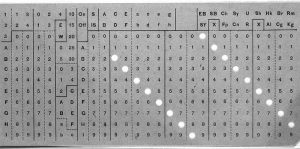
During 1945 and 1954, the first operating systems were developed, which were implemented in rudimentary machines operated from a master console by factory programmers.
It was in the late 1980’s when the Friend Commodore computer had a Video Toaster accelerator that had the capacity to produce effects comparable to those of systems that cost much more than this equipment.
Operating system functions
The operating system has five main functions:
- System-wide resource (this also includes peripherals or devices connected to the equipment)
- Provide a user interface so that, the user can upload programs, access all their files and perform different activities within the PC.
- Manages all files stored and uploaded to the computer. It allows you to create, modify and delete them.
- It offers support and utilitarian tools to manage our computer at the time of updating our system, to control the security and the backup of the same one, to control the peripherals placed to the computer and to correct the errors of the system.
- The administration of tasks in a simple way, which are being executed by both the user and the system.
Types
Task Management
It is separated into two types, in single task and multitasking. Single task are those that only allow one process at a time, while multitask are those that can execute different processes at the same time.
User administration
Like the task separates into two types single-user and multi-user. Single-user are those that can only run a single-user program at a time, while multi-user are those that can run several multi-user programs at a time.
Resource management
As the previous two, is separated into two types: the first one is centralized, which refers to the management and use of resources of a single computer while the distributed is the one that allows using resources from several computers at once.
At the same time, there are currently several types of operating system for different equipment such as cameras and video game consoles, but the main ones are:
- PC operating systems.
- Mobile phone operating systems.
- Intelligent clock operating systems.
Importance
As technology takes giant strides, it also becomes more complex to operate, having to rely on elements such as operating systems for proper performance.
The easiest way to understand this is by seeing the continuous Android operating system updates, which are constantly being renewed to adapt to the needs of equipment developers and their users.
Examples
- Windows
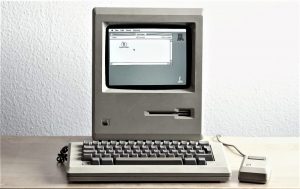
- Mac OS.
- Free BSD.
- Open BSD.
- Google Chrome OS.
- They owed GNU/Linux (GNU/Linux).
- Ubuntu Linux (GNU/Linux).
- Wave OS.
- Mandriva (GNU/Linux).
- Sabayon (GNU/Linux).
- Fedora (GNU/Linux).
- Puppy Linux (GNU/Linux).
- Haiku (BeOS).
- Plan 9.
- HP-UX.
- Tuquito (GNU/Linux).
- Red Hat Enterprise Linux for Desktops or Workstations (GNU/Linux).
- SUSE (GNU/Linux).
- OpenSUSE (GNU/Linux).
- LindowsOS / Linspire.
- Android PC.
- KALI LINUX (GNU/Linux).
- BlackBerry OS.
- BlackBerry 10.
- Windows Phone.
- Windows 10 Mobile.
- Symbian OS.
- HP web OS.
- Firefox OS.
- Ubuntu Phone OS.
- Asha Platform.
- Palm OS.
- Android Wear.
- Wear OS.
- OpenWatch.